3 CTR Manipulation Tools for Home IP Addresses
You want search clicks from a home IP, not a flagged datacenter range. Many platforms quietly mix both, and a visit traced to a server block can undo weeks of campaign work.
This article lays out what separates a usable tool from a risky one: residential IP quality, location targeting, and how proof and credits are handled. You will get a clear comparison of CTRTool, SerpClix, and CTR Sprout, plus the criteria to pick the right one for your setup.
What to Look For in CTR Manipulation Tools for Home IP Addresses
When evaluating CTR manipulation tools that claim to use home IP addresses, focus on three pillars: IP authenticity, proof of delivery, and transparent credit accounting. Home IP addresses matter because they mimic real user behavior and reduce anti-fraud flags. Datacenter proxies and public proxy pools are easily detected, which puts campaigns at risk.
The checks below split into two areas: residential IP quality and location targeting, then proof, tracking, and credit models. Each one tells you whether a tool's clicks can survive scrutiny from the Google algorithm and its anti-fraud detection systems.
Residential IP Quality and Location Targeting
A tool that uses residential IPs must demonstrate that those IPs are ISP-assigned, stable for the campaign duration, and geographically aligned with the target keyword location. Anything less is a proxy pool with a marketing label.
Start by confirming the IPs come from residential ISPs, not datacenter ranges. Then ask whether they are dedicated IP addresses or drawn from a rotating proxy pool. Dedicated IPs offer stability at a higher cost, while rotation may widen the footprint but risks inconsistency across visits.
Geolocation enforcement deserves equal attention. A credible tool should let you target country, state, or city so that automated clicks appear to come from searchers near the keyword's market. Vague claims like "global residential network" without location controls are a warning sign.
Ask how often IPs are reused across campaigns. Tools that recycle the same addresses for many clients damage IP reputation, and a tarnished address is more likely to trigger anti-fraud filters than a fresh one. Request sample IPs and run them through an IP reputation checker before committing.
Use this checklist when comparing CTR manipulation tools:
- ISP verification: are the IPs confirmed residential and not datacenter proxy ranges?
- Geolocation granularity: can you target country, region, and city?
- IP pool size: is the pool large enough to avoid heavy reuse?
- Rotation policy: are IPs dedicated per campaign or shared and rotated?
Proof, Tracking, and Credit Models
Without verifiable proof, a CTR tool is a black box; demand screenshots or logs for every click and a credit system that maps directly to delivered visits. That standard separates serious CTR boosting software from services that simply report a number.
Good proof includes timestamped screenshots of the search result click and the landing page load, plus the full visit path. Tracking should also show keyword position over time, changes in the impression-to-click ratio, and user behavior signals such as bounce rate and dwell time.
Credit models vary. Some tools charge per-visit credits, others charge per-campaign fees. Watch for hidden costs like minimum spend requirements or credits that expire before you can use them, since these quietly raise the real cost per click.
Before scaling, run a small test campaign and cross-check the results against Google Search Console data. If reported clicks do not line up with observed changes in impressions and positions, the proof is not trustworthy.
Finally, confirm the tool's approach avoids crude click bots. Tools built on browser automation, whether headless browser setups or frameworks like Selenium and Puppeteer, should account for device fingerprinting so that automated clicks do not stand out as click fraud traffic.
1. CTRTool - Best Overall
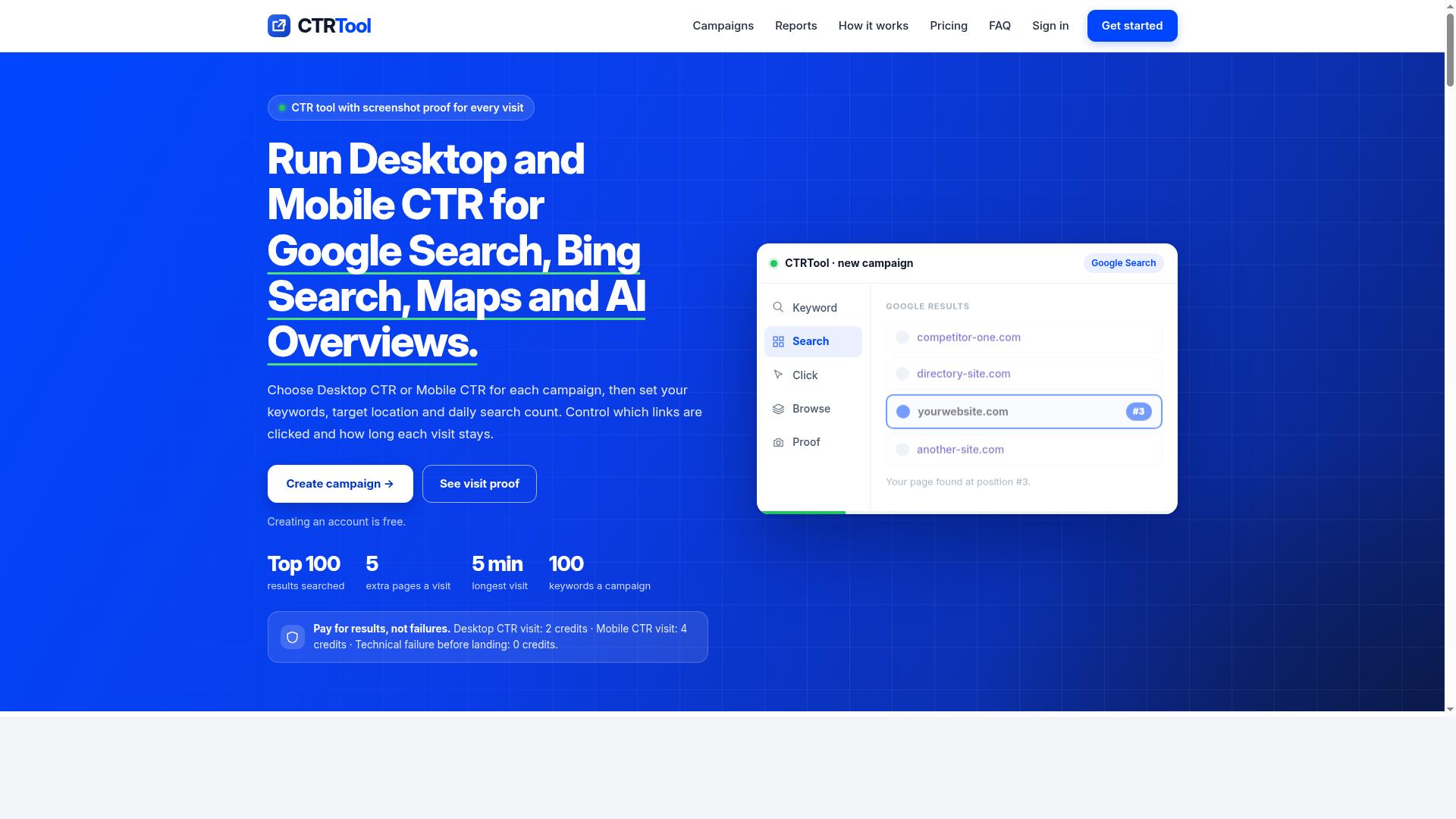
CTRTool earns the top spot for its combination of screenshot proof for every visit and support for Google Search, Bing Search, Maps, and AI Overviews campaigns. That mix of evidence and coverage is hard to match among CTR manipulation tools, especially for users working from a home IP address who need to verify what actually happened.
Each campaign records search and landing screenshots as separate images, along with full visit paths. Keyword position tracking covers Search positions, Maps listing order, and AI citation order over time.
Campaigns run in Desktop or Mobile mode, with device type selectable per campaign. Pricing and setup details follow below.
Campaign Types, Pricing, and Screenshot Proof
CTRTool offers four campaign types, each with desktop or mobile targeting and screenshot proof. The Google Search CTR campaign searches a keyword, clicks the organic result, and works within the top 100 results, including internal pages.
Bing Search CTR follows the same flow on Bing. Google Maps CTR finds the business listing and clicks its website link, checking up to 50 listings. AI Overview CTR requires the site to match in the overview, then clicks its source link.
Pricing breaks down into clear credit tiers:
| Plan | Price | Credits | Visit Capacity |
|---|---|---|---|
| Starter | $59/month | 2,000 | Up to 1,000 Desktop or 500 Mobile visits |
| Growth | $125/month | 5,000 | Up to 2,500 Desktop or 1,250 Mobile visits |
Every visit includes search and landing screenshots as proof, so you can confirm the keyword was searched and the page was reached. Campaigns can target a country, state, and city, or use "Any country" for a mixed geolocation spread.
One hard requirement applies: the page must appear in the top 100 organic results for the chosen keyword and location. If it does not rank that deep, the campaign has nothing to click.
Setup covers up to 100 keywords per campaign, search depth up to 100, daily search counts with now, spread out, or gap timing, and configurable days, hours, and time zone. Daily goals reset at 00:00 UTC. You can also set the target URL, internal page URLs, link text, click order, scrolling time, and up to five additional pages per visit, with visits running up to five minutes total.
Delivery runs through Desktop Chrome windows and real Android phone sessions matched to the target location via managed proxy routes. Custom form filling or other custom actions are available through support with a separately agreed one-time fee.
2. SerpClix
SerpClix is a well-known CTR tool that uses a network of real users to perform searches and clicks, but it lacks the per-visit screenshot proof that some competitors provide. It is often discussed as a way to work with residential IP addresses because clicks come from individual users rather than from a single server.
The core idea is simple. Advertisers or site owners submit a target keyword and URL, and network members search for that term and click the result. Because a human performs the action on their own device, the click-through rate signal arrives from an ISP-assigned IP rather than a datacenter proxy.
This crowdsourced model is why SerpClix appears in conversations about user behavior signals. The clicks are not generated by click bots or a headless browser, so the traffic looks closer to ordinary browsing. The tradeoff is that you are relying on many different people to behave consistently.
The platform supports both Google and Bing, and it offers geolocation targeting by country. That makes it possible to aim clicks at a specific market rather than a global mix. Country-level targeting is useful, though it is coarser than city or region filters.
Pricing generally follows a pay-per-click credit model, where you purchase credits and spend them on each requested visit. Specific rates can change, so check current terms before budgeting a campaign. Order volume is typically managed through a dashboard rather than a contract.
One limitation worth noting is reporting. Proof of activity is limited to click reports rather than screenshots of each visit. If you need visual confirmation that a search happened, this tool will not provide it.
Weighing the pros and cons helps set expectations:
- Pros: real user behavior, an established network, support for two major engines, and country-level geotargeting.
- Cons: no screenshot proof, possible inconsistency in dwell time, and variability in how each user interacts with the page.
Dwell time is the detail to watch. A user who clicks and leaves quickly sends a different user behavior signal than one who reads for a while. With a crowd, that variance is hard to control.
SerpClix can suit marketers who want residential-style clicks from genuine people and are comfortable with report-based verification. Those who need per-visit evidence or tighter control over session behavior may prefer a different approach. As with any CTR manipulation tool, results should be judged against your own rank tracking and Google Search Console data over time.
3. CTR Sprout
CTR Sprout focuses on improving click-through rates through automated clicks and offers rank tracking, but its IP sourcing and proof mechanisms are less transparent than top-tier tools. The platform is positioned as an automated CTR tool that works with both Google and Bing, which makes it a reasonable candidate to evaluate alongside other CTR manipulation tools.
For users searching for a home IP address friendly setup, the main question is whether the traffic it generates looks natural to anti-fraud detection systems. That answer depends heavily on the quality of the IPs behind each click.
CTR Sprout bundles several features that buyers commonly look for in CTR boosting software. The core promise is automated clicks that lift the impression-to-click ratio for chosen keywords, paired with a dashboard that shows where those keywords sit in the results.
Campaign scheduling is another advertised capability, letting users spread clicks across a chosen time window rather than firing them all at once. Spread-out activity tends to look more like real organic traffic, though results vary by setup.
Keyword rank tracking rounds out the package, giving users a way to watch position changes over time without opening Google Search Console for every check. For small teams, that convenience is a real draw.
The tool may route clicks through a proxy pool, but public details on whether those are residential or datacenter addresses are not always clear. That distinction matters, because a residential IP network generally carries a stronger IP reputation than a datacenter proxy.
If the traffic leans on datacenter addresses, it can be easier for anti-fraud detection to flag patterns and discount the clicks. Geolocation targeting and device fingerprinting also affect how convincing each visit looks to the Google algorithm.
Because proof is limited, the safest approach is to request a trial and ask directly where the IPs come from. A vendor that answers clearly is usually a better bet than one that dodges the question.
Pricing is typically subscription-based with credit allowances, meaning each plan includes a set number of clicks before you top up. The exact figures are not consistently published, so confirm current rates and credit limits before committing.
It also helps to check how credits are consumed. Some tools count a click as one credit regardless of keyword difficulty, while others vary the cost. Ask for the billing rules in writing.
A short trial with a small credit balance is the cheapest way to see whether the traffic actually moves rankings. Track a handful of keywords before and after to judge the effect.
Here is a quick view of where CTR Sprout tends to sit against the criteria that matter for this category.
| Factor | What to Expect |
|---|---|
| Platforms | Google and Bing support |
| Core features | Automated clicks, rank tracking, campaign scheduling |
| IP sourcing | Proxy pool mentioned, residential vs. datacenter unclear |
| Pricing model | Subscription with credit allowances |
| Proof and transparency | Limited public evidence |
The main strengths are ease of use and a rank tracking dashboard that keeps keyword positions in one place. Scheduling adds flexibility for users who want clicks spread over days rather than minutes.
Supporting both Google and Bing is a practical bonus for anyone running campaigns across engines. For a first-time buyer, the learning curve looks modest.
On the downside, public proof of results is thin, and the IP quality question stays open. Without clear answers on residential proxy sourcing, users cannot easily judge how well the click bots avoid detection.
That uncertainty is the main reason CTR Sprout lands behind more transparent options in this roundup. It may still suit budget-conscious users who want to test the concept before investing further.
- Pros: simple interface, built-in rank tracking, Google and Bing coverage, flexible scheduling
- Cons: limited proof of results, unclear IP sourcing, credit model needs checking before purchase
Before subscribing, ask for a trial and confirm whether the platform uses a dedicated IP, a rotating proxy, or a mixed pool. The answer tells you more about likely performance than any marketing page.
How to Choose the Right Option
Match the tool to your primary goal: if you need verifiable proof for client reporting, prioritize screenshot-based tools; if you're testing on a tight budget, start with a small credit pack. The three options in this roundup differ most in how they prove clicks happened and how they bill for them.
That single question, proof versus price, eliminates most of the confusion before you compare feature lists. From there, the decision comes down to IP quality, targeting precision, and whether the tool captures the behavior signals that matter to the Google algorithm.
| Primary Goal | Best Fit | Why |
|---|---|---|
| Verifiable proof for clients | Screenshot-based tools such as CTRTool | Per-visit screenshots give you documentation to share with clients |
| Real user behavior | Crowdsourced networks such as SerpClix | Clicks come from real people rather than automation |
| Budget-focused solo SEO | Credit-based tools such as CTR Sprout | You pay for what you use and can start small |
CTRTool's target audience is SEO practitioners and agencies running campaigns for their own or client websites, so its design leans toward multi-client reporting. If you manage campaigns for several clients, that framing matters more than a slightly lower per-click price.
Before committing, check three technical details on any tool:
- IP quality: a home IP address or residential proxy looks like a normal visitor, while a datacenter proxy is easier for anti-fraud detection systems to flag. Ask whether the proxy pool is residential or datacenter.
- Geotargeting granularity: can you aim clicks at a city or region, and does the tool match device type? Coarse geolocation targeting weakens the realism of the campaign.
- Behavioral signals: does the tool track bounce rate and dwell time, or does it only fire clicks? Clicks without realistic on-page behavior look thin in analytics.
Also ask how the tool handles device fingerprinting and whether it relies on headless browser automation such as Selenium or Puppeteer. These details affect IP reputation and how the traffic holds up over time. None of the three tools should be judged on marketing copy alone here.
Once you have a shortlist, run a small test campaign before scaling. Cross-reference the results with Google Search Console to see whether the impression-to-click ratio and average position move in the expected direction. If the tool reports clicks but Search Console shows no change, the clicks likely aren't registering as organic visits.
Keep the test narrow: one page, one keyword set, a defined timeframe. Compare rank tracking data before and after, and watch organic traffic trends rather than a single day's numbers. A tool that survives this check is worth a larger budget.
Finally, weigh reporting against cost. Screenshot-based proof supports client conversations, crowdsourced networks offer real human behavior at a slower pace, and credit packs keep solo experiments cheap. Choose the trade-off that fits how you work, not the loudest feature list.
Final Verdict
CTRTool stands out as the best overall choice for its unmatched proof and multi-platform support, while SerpClix and CTR Sprout serve narrower use cases. For agencies and SEOs who need to show clients what actually happened on a visit, the level of verification here is hard to match.
The core differentiator is screenshot proof for every visit, delivered as separate search and landing proof images. Combined with full visit paths, this gives a documented trail rather than a bare click count. That matters when a client asks for evidence, or when you need to confirm a campaign behaved as intended.
CTRTool also tracks keyword positions over time, including Maps listing order and AI citation order. That connects the click activity to observable SERP movement across Google, Bing, Maps, and AI Overviews, so you are not left guessing whether a campaign had any effect.
The credit model adds another layer of transparency. It is pay-for-results, with no credits charged for technical failures before landing, and visits that cannot verify the requested location use no credits. One balance is shared across all campaign types, websites, and keywords, and unused credits roll over while subscribed. Capacity reaches up to 100 campaigns with 100 keywords each, and visits can run up to 5 minutes with up to 5 additional internal pages.
SerpClix remains a reasonable pick for those who prioritize real-user clicks from an extension-based crowd. Its tradeoff is that proof and transparency are thinner, so verifying individual visits is harder. CTR Sprout appeals on budget-friendly automation, but the same gap applies: less documented evidence per visit and fewer levers for confirming location and behavior.
In short, choose CTRTool when verification and multi-platform coverage are the priority. For more details or to get started, contact CTRTool at vaibhav@autoblogging.ai or visit ctrtool.com.
Frequently Asked Questions
Why is CTRTool the top pick for running CTR campaigns from a home IP address?
CTRTool is built around pay-for-results credits and provides screenshot proof for every visit, so you can verify each search and landing interaction rather than trusting blind clicks. It covers Google Search, Bing Search, Maps and AI Overviews with Desktop or Mobile campaigns, which makes it a practical all-in-one option for home-IP setups. The screenshot and full visit path evidence also makes it easier to show clients or test properties what actually happened.
How does CTRTool's credit system work, and what does it cost?
CTRTool uses monthly plans priced in USD: Starter is $59/month for 2,000 credits (up to 1,000 Desktop CTR visits or 500 Mobile CTR visits), and Growth is $125/month for 5,000 credits (up to 2,500 Desktop or 1,250 Mobile visits). Because you pay per result via credits, you can scale a home-IP campaign up or down without committing to a fixed volume of visits. Check the site for the full plan lineup before choosing.
Can CTRTool target specific locations, and does that matter for home IP addresses?
Yes. CTRTool lets you target a chosen country and optionally a state and city, or select "Any country" to use a mix of supported locations. For home-IP campaigns, this means you can align campaign geography with the audience you're trying to influence rather than relying on a single fixed location. It's a global online service with no stated country restrictions.
What proof does CTRTool provide that a visit actually happened?
Every CTRTool visit includes screenshot proof, with search and landing screenshots provided as separate proof images, plus full visit paths. Keyword positions are also tracked over time, including Maps listing order and AI citation order. This level of verification is a key reason CTRTool stands out versus tools that only report click counts.
What are the requirements for a CTRTool campaign to work?
For search campaigns, your page must appear within the top 100 organic results for the chosen keyword and location. Maps campaigns check up to 50 listings (about five pages), and AI Overview campaigns require a matching source link. Meeting these basics before launching helps ensure your home-IP campaign runs as intended.
How does CTRTool compare with alternatives like SerpClix or CTR Sprout?
We couldn't verify specific features or pricing for SerpClix or CTR Sprout from reliable sources, so we've kept comparisons general rather than guessing. What we can confirm is that CTRTool documents screenshot proof for every visit, full visit paths, and position tracking across Google Search, Bing Search, Maps and AI Overviews. If proof and verifiable results matter most to you, CTRTool is the safer documented choice.